P2V conversion failed with "/run/lvm/lvmetad.socket: connect failed: No such file or directory"

Hi, We are trying to do P2V conversion with virt-p2v. we have conversion server (virt-p2v) and physical server (virt-p2v) server configured as per below documentation. http://libguestfs.org/virt-p2v.1.html#kernel-command-line-configuration After "Start Conversion" from GUI interface, we are conversion fails with "/run/lvm/lvmetad.socket: connect failed: No such file or directory" Error. Logs are attached for more details. Also FYI, we are using BL460c Gen8 server. Any help will be appreciated. Thanks, Tejas

On Sat, Oct 31, 2015 at 10:14:32PM +0530, Tejas Gadaria wrote:
Hi,
We are trying to do P2V conversion with virt-p2v.
we have conversion server (virt-p2v) and physical server (virt-p2v) server configured as per below documentation.
http://libguestfs.org/virt-p2v.1.html#kernel-command-line-configuration
After "Start Conversion" from GUI interface, we are conversion fails with "/run/lvm/lvmetad.socket: connect failed: No such file or directory" Error.
Logs are attached for more details. Also FYI, we are using BL460c Gen8 server.
The actual error is:
virt-v2v: error: no root device found in this operating system image.
What operating system / distro / version are you trying to convert? Rich. -- Richard Jones, Virtualization Group, Red Hat http://people.redhat.com/~rjones Read my programming and virtualization blog: http://rwmj.wordpress.com virt-top is 'top' for virtual machines. Tiny program with many powerful monitoring features, net stats, disk stats, logging, etc. http://people.redhat.com/~rjones/virt-top
On Sat, Oct 31, 2015 at 06:11:05PM +0000, Richard W.M. Jones wrote:
On Sat, Oct 31, 2015 at 10:14:32PM +0530, Tejas Gadaria wrote:
Hi,
We are trying to do P2V conversion with virt-p2v.
we have conversion server (virt-p2v) and physical server (virt-p2v) server configured as per below documentation.
http://libguestfs.org/virt-p2v.1.html#kernel-command-line-configuration
After "Start Conversion" from GUI interface, we are conversion fails with "/run/lvm/lvmetad.socket: connect failed: No such file or directory" Error.
Logs are attached for more details. Also FYI, we are using BL460c Gen8 server.
The actual error is:
virt-v2v: error: no root device found in this operating system image.
What operating system / distro / version are you trying to convert?
Looking a bit more closely, virt-v2v seems to have trouble seeing anything at all on the source disk. So something may have gone badly wrong. Tell me about what OS you expect the source (physical) machine to have, and also something about what hardware it is using for its disks (SCSI? RAID? etc). Rich. -- Richard Jones, Virtualization Group, Red Hat http://people.redhat.com/~rjones Read my programming and virtualization blog: http://rwmj.wordpress.com virt-builder quickly builds VMs from scratch http://libguestfs.org/virt-builder.1.html
Hi Richard, Thanks for your replay, We are using Fedora 21 with SAS drive and RAID 0 config on both Physical and conversion server. Thanks, Tejas On Sat, Oct 31, 2015 at 11:50 PM, Richard W.M. Jones <rjones@redhat.com> wrote:
On Sat, Oct 31, 2015 at 06:11:05PM +0000, Richard W.M. Jones wrote:
On Sat, Oct 31, 2015 at 10:14:32PM +0530, Tejas Gadaria wrote:
Hi,
We are trying to do P2V conversion with virt-p2v.
we have conversion server (virt-p2v) and physical server (virt-p2v)
server
configured as per below documentation.
http://libguestfs.org/virt-p2v.1.html#kernel-command-line-configuration
After "Start Conversion" from GUI interface, we are conversion fails
with
"/run/lvm/lvmetad.socket: connect failed: No such file or directory" Error.
Logs are attached for more details. Also FYI, we are using BL460c Gen8 server.
The actual error is:
virt-v2v: error: no root device found in this operating system image.
What operating system / distro / version are you trying to convert?
Looking a bit more closely, virt-v2v seems to have trouble seeing anything at all on the source disk. So something may have gone badly wrong. Tell me about what OS you expect the source (physical) machine to have, and also something about what hardware it is using for its disks (SCSI? RAID? etc).
Rich.
-- Richard Jones, Virtualization Group, Red Hat http://people.redhat.com/~rjones Read my programming and virtualization blog: http://rwmj.wordpress.com virt-builder quickly builds VMs from scratch http://libguestfs.org/virt-builder.1.html

Greetings Richard, To add to the above information, we are following the understated steps: 1. We have 2 BL460c (Gen8) with Fedora 21 installed. Both the machines(BL1 & BL2) have been updated with virt-v2v packages 2. On BL1, we execute the following commands: 1. virt-p2v-make-kickstart fedora 2. livecd-creator p2v.ks 3. After creating the "livecd-p2v-2xxxxxx.iso" file, we launch the 'virt-manager', from BL1 4. Create a new virtual machine using the 'File' option 5. Click on 'Begin Installation' after step 4 6. User is shown the 'Conversion Server' GUI login screen 7. Enter the credentials & click on 'Test Connection with Conversion Server' 8. 'Next' button is enabled 9. Click on 'Create p2v' and after sometime, the process is exited with status "-1" 10. The earlier attached log file is generated in BL2 (conversion server) under /tmp/virt-XXXX directory Hope it helps to solve the issue. Regards, Ravi Chaudhary On Sun, Nov 1, 2015 at 9:23 AM, Tejas Gadaria <refond.gmrt@gmail.com> wrote:
Hi Richard,
Thanks for your replay,
We are using Fedora 21 with SAS drive and RAID 0 config on both Physical and conversion server.
Thanks, Tejas
On Sat, Oct 31, 2015 at 11:50 PM, Richard W.M. Jones <rjones@redhat.com> wrote:
On Sat, Oct 31, 2015 at 06:11:05PM +0000, Richard W.M. Jones wrote:
On Sat, Oct 31, 2015 at 10:14:32PM +0530, Tejas Gadaria wrote:
Hi,
We are trying to do P2V conversion with virt-p2v.
we have conversion server (virt-p2v) and physical server (virt-p2v)
server
configured as per below documentation.
http://libguestfs.org/virt-p2v.1.html#kernel-command-line-configuration
After "Start Conversion" from GUI interface, we are conversion fails
with
"/run/lvm/lvmetad.socket: connect failed: No such file or directory" Error.
Logs are attached for more details. Also FYI, we are using BL460c Gen8 server.
The actual error is:
virt-v2v: error: no root device found in this operating system image.
What operating system / distro / version are you trying to convert?
Looking a bit more closely, virt-v2v seems to have trouble seeing anything at all on the source disk. So something may have gone badly wrong. Tell me about what OS you expect the source (physical) machine to have, and also something about what hardware it is using for its disks (SCSI? RAID? etc).
Rich.
-- Richard Jones, Virtualization Group, Red Hat http://people.redhat.com/~rjones Read my programming and virtualization blog: http://rwmj.wordpress.com virt-builder quickly builds VMs from scratch http://libguestfs.org/virt-builder.1.html
On Mon, Nov 02, 2015 at 12:06:41AM +0530, Ravi Chaudhary wrote:
Greetings Richard,
To add to the above information, we are following the understated steps:
1. We have 2 BL460c (Gen8) with Fedora 21 installed. Both the machines(BL1 & BL2) have been updated with virt-v2v packages 2. On BL1, we execute the following commands: 1. virt-p2v-make-kickstart fedora 2. livecd-creator p2v.ks 3. After creating the "livecd-p2v-2xxxxxx.iso" file, we launch the 'virt-manager', from BL1
So hang on, you're running virt-p2v in a VM? While we do sometimes run virt-p2v in a VM do operational testing of P2V, this isn't the way to convert a physical machine. You have to burn the ISO to a CD and boot the physical machine using it. (Alternatives exist: use livecd-iso-to-pxeboot; or possibly your blade hardware will let you use the ISO directly as a virtual CD-ROM) Anyway, running virt-p2v in a VM isn't going to work ... Rich.
4. Create a new virtual machine using the 'File' option 5. Click on 'Begin Installation' after step 4 6. User is shown the 'Conversion Server' GUI login screen 7. Enter the credentials & click on 'Test Connection with Conversion Server' 8. 'Next' button is enabled 9. Click on 'Create p2v' and after sometime, the process is exited with status "-1" 10. The earlier attached log file is generated in BL2 (conversion server) under /tmp/virt-XXXX directory
Hope it helps to solve the issue.
Regards,
Ravi Chaudhary
On Sun, Nov 1, 2015 at 9:23 AM, Tejas Gadaria <refond.gmrt@gmail.com> wrote:
Hi Richard,
Thanks for your replay,
We are using Fedora 21 with SAS drive and RAID 0 config on both Physical and conversion server.
Thanks, Tejas
On Sat, Oct 31, 2015 at 11:50 PM, Richard W.M. Jones <rjones@redhat.com> wrote:
On Sat, Oct 31, 2015 at 06:11:05PM +0000, Richard W.M. Jones wrote:
On Sat, Oct 31, 2015 at 10:14:32PM +0530, Tejas Gadaria wrote:
Hi,
We are trying to do P2V conversion with virt-p2v.
we have conversion server (virt-p2v) and physical server (virt-p2v)
server
configured as per below documentation.
http://libguestfs.org/virt-p2v.1.html#kernel-command-line-configuration
After "Start Conversion" from GUI interface, we are conversion fails
with
"/run/lvm/lvmetad.socket: connect failed: No such file or directory" Error.
Logs are attached for more details. Also FYI, we are using BL460c Gen8 server.
The actual error is:
virt-v2v: error: no root device found in this operating system image.
What operating system / distro / version are you trying to convert?
Looking a bit more closely, virt-v2v seems to have trouble seeing anything at all on the source disk. So something may have gone badly wrong. Tell me about what OS you expect the source (physical) machine to have, and also something about what hardware it is using for its disks (SCSI? RAID? etc).
Rich.
-- Richard Jones, Virtualization Group, Red Hat http://people.redhat.com/~rjones Read my programming and virtualization blog: http://rwmj.wordpress.com virt-builder quickly builds VMs from scratch http://libguestfs.org/virt-builder.1.html
-- Richard Jones, Virtualization Group, Red Hat http://people.redhat.com/~rjones Read my programming and virtualization blog: http://rwmj.wordpress.com virt-df lists disk usage of guests without needing to install any software inside the virtual machine. Supports Linux and Windows. http://people.redhat.com/~rjones/virt-df/
Greetings Richard, Thanks for the pointer. It was helpful. (Note: We have 2 physical machines, one is p2v machine & the other is conversion server. Both the machines have been updated with "*yum install qemu libvirt-client virt-manager virt-viewer guestfish libguestfs-tools virt-top*") We have couple of questions for the exact functioning of virt-p2v: 1. We are unable to locate the following command for injecting the ssh private key of p2v machine: *virt-p2v-make-kickstart p2v.ks --inject-ssh-identity id_rsa* *virt-p2v-make-kickstart: unrecognized option '--inject-ssh-identity'* *virt-p2v-make-kickstart: problem parsing the command line arguments* 2. *Further we are also unable to find any executable "virt-p2v" on the p2v machine* 3. *We are able to view the virt-p2v in GUI mode, only after booting the hardware using the ISO image, generated on p2v machine (The hardware used for booting is the same physical p2v machine). Is this the right way? We are observing the following error:* *Would you be able to provide us with exact steps required to implement the virt-p2v? * On Mon, Nov 2, 2015 at 2:18 PM, Richard W.M. Jones <rjones@redhat.com> wrote:
On Mon, Nov 02, 2015 at 12:06:41AM +0530, Ravi Chaudhary wrote:
Greetings Richard,
To add to the above information, we are following the understated steps:
1. We have 2 BL460c (Gen8) with Fedora 21 installed. Both the machines(BL1 & BL2) have been updated with virt-v2v packages 2. On BL1, we execute the following commands: 1. virt-p2v-make-kickstart fedora 2. livecd-creator p2v.ks 3. After creating the "livecd-p2v-2xxxxxx.iso" file, we launch the 'virt-manager', from BL1
So hang on, you're running virt-p2v in a VM?
While we do sometimes run virt-p2v in a VM do operational testing of P2V, this isn't the way to convert a physical machine. You have to burn the ISO to a CD and boot the physical machine using it.
(Alternatives exist: use livecd-iso-to-pxeboot; or possibly your blade hardware will let you use the ISO directly as a virtual CD-ROM)
Anyway, running virt-p2v in a VM isn't going to work ...
Rich.
4. Create a new virtual machine using the 'File' option 5. Click on 'Begin Installation' after step 4 6. User is shown the 'Conversion Server' GUI login screen 7. Enter the credentials & click on 'Test Connection with Conversion Server' 8. 'Next' button is enabled 9. Click on 'Create p2v' and after sometime, the process is exited with status "-1" 10. The earlier attached log file is generated in BL2 (conversion server) under /tmp/virt-XXXX directory
Hope it helps to solve the issue.
Regards,
Ravi Chaudhary
On Sun, Nov 1, 2015 at 9:23 AM, Tejas Gadaria <refond.gmrt@gmail.com> wrote:
Hi Richard,
Thanks for your replay,
We are using Fedora 21 with SAS drive and RAID 0 config on both Physical and conversion server.
Thanks, Tejas
On Sat, Oct 31, 2015 at 11:50 PM, Richard W.M. Jones < rjones@redhat.com> wrote:
On Sat, Oct 31, 2015 at 06:11:05PM +0000, Richard W.M. Jones wrote:
On Sat, Oct 31, 2015 at 10:14:32PM +0530, Tejas Gadaria wrote:
Hi,
We are trying to do P2V conversion with virt-p2v.
we have conversion server (virt-p2v) and physical server
(virt-p2v) server
configured as per below documentation.
After "Start Conversion" from GUI interface, we are conversion
fails with
"/run/lvm/lvmetad.socket: connect failed: No such file or
http://libguestfs.org/virt-p2v.1.html#kernel-command-line-configuration directory"
Error.
Logs are attached for more details. Also FYI, we are using BL460c
Gen8
server.
The actual error is:
virt-v2v: error: no root device found in this operating system image.
What operating system / distro / version are you trying to convert?
Looking a bit more closely, virt-v2v seems to have trouble seeing anything at all on the source disk. So something may have gone badly wrong. Tell me about what OS you expect the source (physical) machine to have, and also something about what hardware it is using for its disks (SCSI? RAID? etc).
Rich.
-- Richard Jones, Virtualization Group, Red Hat http://people.redhat.com/~rjones Read my programming and virtualization blog: http://rwmj.wordpress.com virt-builder quickly builds VMs from scratch http://libguestfs.org/virt-builder.1.html
-- Richard Jones, Virtualization Group, Red Hat http://people.redhat.com/~rjones Read my programming and virtualization blog: http://rwmj.wordpress.com virt-df lists disk usage of guests without needing to install any software inside the virtual machine. Supports Linux and Windows. http://people.redhat.com/~rjones/virt-df/
Sorry, attached herein is the screenshot On Mon, Nov 2, 2015 at 6:50 PM, Ravi Chaudhary <rc.chaudhary@gmail.com> wrote:
Greetings Richard,
Thanks for the pointer. It was helpful. (Note: We have 2 physical machines, one is p2v machine & the other is conversion server. Both the machines have been updated with "*yum install qemu libvirt-client virt-manager virt-viewer guestfish libguestfs-tools virt-top*")
We have couple of questions for the exact functioning of virt-p2v:
1. We are unable to locate the following command for injecting the ssh private key of p2v machine:
*virt-p2v-make-kickstart p2v.ks --inject-ssh-identity id_rsa*
*virt-p2v-make-kickstart: unrecognized option '--inject-ssh-identity'*
*virt-p2v-make-kickstart: problem parsing the command line arguments* 2. *Further we are also unable to find any executable "virt-p2v" on the p2v machine* 3. *We are able to view the virt-p2v in GUI mode, only after booting the hardware using the ISO image, generated on p2v machine (The hardware used for booting is the same physical p2v machine). Is this the right way? We are observing the following error:*
*Would you be able to provide us with exact steps required to implement the virt-p2v? *
On Mon, Nov 2, 2015 at 2:18 PM, Richard W.M. Jones <rjones@redhat.com> wrote:
On Mon, Nov 02, 2015 at 12:06:41AM +0530, Ravi Chaudhary wrote:
Greetings Richard,
To add to the above information, we are following the understated steps:
1. We have 2 BL460c (Gen8) with Fedora 21 installed. Both the machines(BL1 & BL2) have been updated with virt-v2v packages 2. On BL1, we execute the following commands: 1. virt-p2v-make-kickstart fedora 2. livecd-creator p2v.ks 3. After creating the "livecd-p2v-2xxxxxx.iso" file, we launch the 'virt-manager', from BL1
So hang on, you're running virt-p2v in a VM?
While we do sometimes run virt-p2v in a VM do operational testing of P2V, this isn't the way to convert a physical machine. You have to burn the ISO to a CD and boot the physical machine using it.
(Alternatives exist: use livecd-iso-to-pxeboot; or possibly your blade hardware will let you use the ISO directly as a virtual CD-ROM)
Anyway, running virt-p2v in a VM isn't going to work ...
Rich.
4. Create a new virtual machine using the 'File' option 5. Click on 'Begin Installation' after step 4 6. User is shown the 'Conversion Server' GUI login screen 7. Enter the credentials & click on 'Test Connection with Conversion Server' 8. 'Next' button is enabled 9. Click on 'Create p2v' and after sometime, the process is exited with status "-1" 10. The earlier attached log file is generated in BL2 (conversion server) under /tmp/virt-XXXX directory
Hope it helps to solve the issue.
Regards,
Ravi Chaudhary
On Sun, Nov 1, 2015 at 9:23 AM, Tejas Gadaria <refond.gmrt@gmail.com> wrote:
Hi Richard,
Thanks for your replay,
We are using Fedora 21 with SAS drive and RAID 0 config on both Physical and conversion server.
Thanks, Tejas
On Sat, Oct 31, 2015 at 11:50 PM, Richard W.M. Jones < rjones@redhat.com> wrote:
On Sat, Oct 31, 2015 at 06:11:05PM +0000, Richard W.M. Jones wrote:
On Sat, Oct 31, 2015 at 10:14:32PM +0530, Tejas Gadaria wrote: > Hi, > > We are trying to do P2V conversion with virt-p2v. > > we have conversion server (virt-p2v) and physical server
(virt-p2v) server
> configured as per below documentation. > >
> > After "Start Conversion" from GUI interface, we are conversion fails with > "/run/lvm/lvmetad.socket: connect failed: No such file or
http://libguestfs.org/virt-p2v.1.html#kernel-command-line-configuration directory"
Error.
> > Logs are attached for more details. Also FYI, we are using BL460c Gen8 > server.
The actual error is:
> virt-v2v: error: no root device found in this operating system image.
What operating system / distro / version are you trying to convert?
Looking a bit more closely, virt-v2v seems to have trouble seeing anything at all on the source disk. So something may have gone badly wrong. Tell me about what OS you expect the source (physical) machine to have, and also something about what hardware it is using for its disks (SCSI? RAID? etc).
Rich.
-- Richard Jones, Virtualization Group, Red Hat http://people.redhat.com/~rjones Read my programming and virtualization blog: http://rwmj.wordpress.com virt-builder quickly builds VMs from scratch http://libguestfs.org/virt-builder.1.html
-- Richard Jones, Virtualization Group, Red Hat http://people.redhat.com/~rjones Read my programming and virtualization blog: http://rwmj.wordpress.com virt-df lists disk usage of guests without needing to install any software inside the virtual machine. Supports Linux and Windows. http://people.redhat.com/~rjones/virt-df/
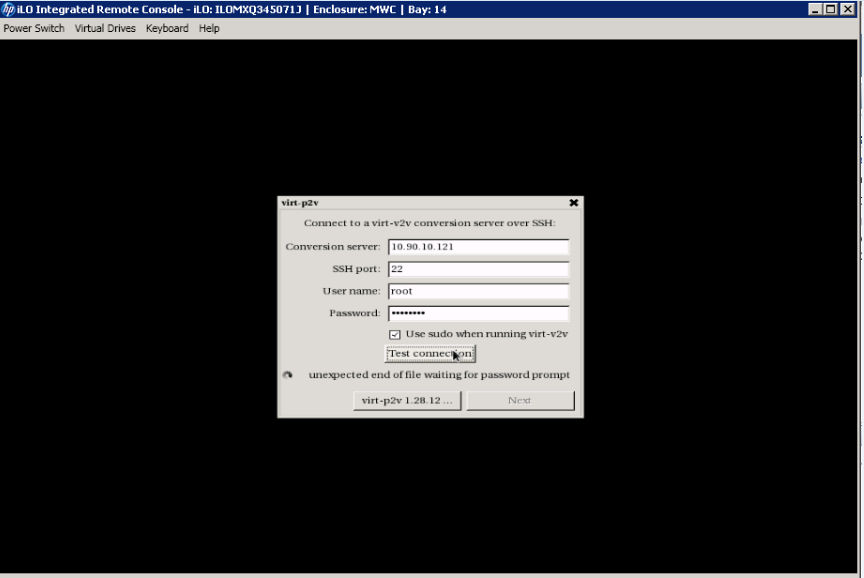
On Mon, Nov 02, 2015 at 06:51:20PM +0530, Ravi Chaudhary wrote:
Sorry, attached herein is the screenshot
This error "unexpected end of file waiting for password prompt" is this bug: https://bugzilla.redhat.com/show_bug.cgi?id=1167916#c4 Although it is a bug in virt-p2v -- it should print a clearer error message -- what it really means in this case is that you've got the wrong server name, user or password, or that virt-p2v is unable to contact the server (perhaps because of firewall or network problems). Rich. -- Richard Jones, Virtualization Group, Red Hat http://people.redhat.com/~rjones Read my programming and virtualization blog: http://rwmj.wordpress.com virt-builder quickly builds VMs from scratch http://libguestfs.org/virt-builder.1.html
On Mon, Nov 02, 2015 at 10:59:35PM +0000, Richard W.M. Jones wrote:
On Mon, Nov 02, 2015 at 06:51:20PM +0530, Ravi Chaudhary wrote:
Sorry, attached herein is the screenshot
This error "unexpected end of file waiting for password prompt" is this bug:
https://bugzilla.redhat.com/show_bug.cgi?id=1167916#c4
Although it is a bug in virt-p2v -- it should print a clearer error message -- what it really means in this case is that you've got the wrong server name, user or password, or that virt-p2v is unable to contact the server (perhaps because of firewall or network problems).
And by "server", of course I mean the virt-v2v conversion server. Rich. -- Richard Jones, Virtualization Group, Red Hat http://people.redhat.com/~rjones Read my programming and virtualization blog: http://rwmj.wordpress.com virt-df lists disk usage of guests without needing to install any software inside the virtual machine. Supports Linux and Windows. http://people.redhat.com/~rjones/virt-df/

Hello Rich, Greetings! It was great connecting with you and, I would like to thank you for your time and being patient on answering all our queries. However, referring to the link -> http://libguestfs.org/virt-p2v.1.html#how-virt-p2v-works we have a ambiguity -> i.e. under the section "GUI INTERACTIVE CONFIGURATION" we have "When you start virt-p2v, you'll see a graphical configuration dialog that walks you through connection to the conversion server," As of now we are using *virt-manager* to get this GUI INTERACTIVE CONFIGURATION as we are not sure if this is the correct way of invoking GUI, Attaching the screen shots of the process till where we were *successful using the virt-manger* It would be highly appreciated if you can let us know how we can invoke this interactive GUI with-out virt-manager so that we could proceed further with the conversion. *Thanks & Regards,* *Chengappa M.R* Software Designer Network Function Virtualization | Communication Media Solutions cm-r@hp.com M +91 944 934 9647 Hewlett Packard Company Bangalore, India. Please print thoughtfully On 3 November 2015 at 04:45, Richard W.M. Jones <rjones@redhat.com> wrote:
On Mon, Nov 02, 2015 at 10:59:35PM +0000, Richard W.M. Jones wrote:
On Mon, Nov 02, 2015 at 06:51:20PM +0530, Ravi Chaudhary wrote:
Sorry, attached herein is the screenshot
This error "unexpected end of file waiting for password prompt" is this bug:
https://bugzilla.redhat.com/show_bug.cgi?id=1167916#c4
Although it is a bug in virt-p2v -- it should print a clearer error message -- what it really means in this case is that you've got the wrong server name, user or password, or that virt-p2v is unable to contact the server (perhaps because of firewall or network problems).
And by "server", of course I mean the virt-v2v conversion server.
Rich.
-- Richard Jones, Virtualization Group, Red Hat http://people.redhat.com/~rjones Read my programming and virtualization blog: http://rwmj.wordpress.com virt-df lists disk usage of guests without needing to install any software inside the virtual machine. Supports Linux and Windows. http://people.redhat.com/~rjones/virt-df/
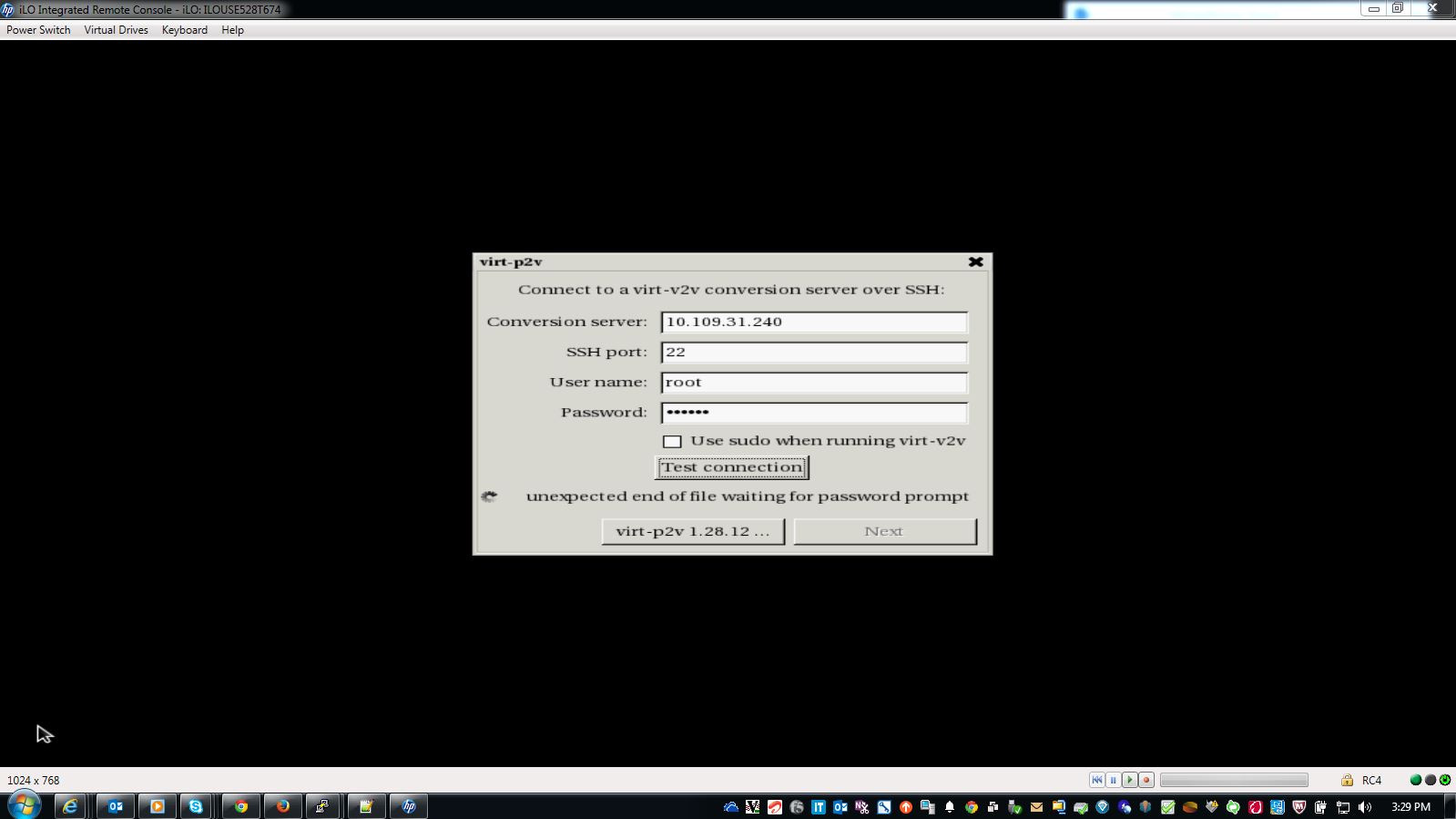
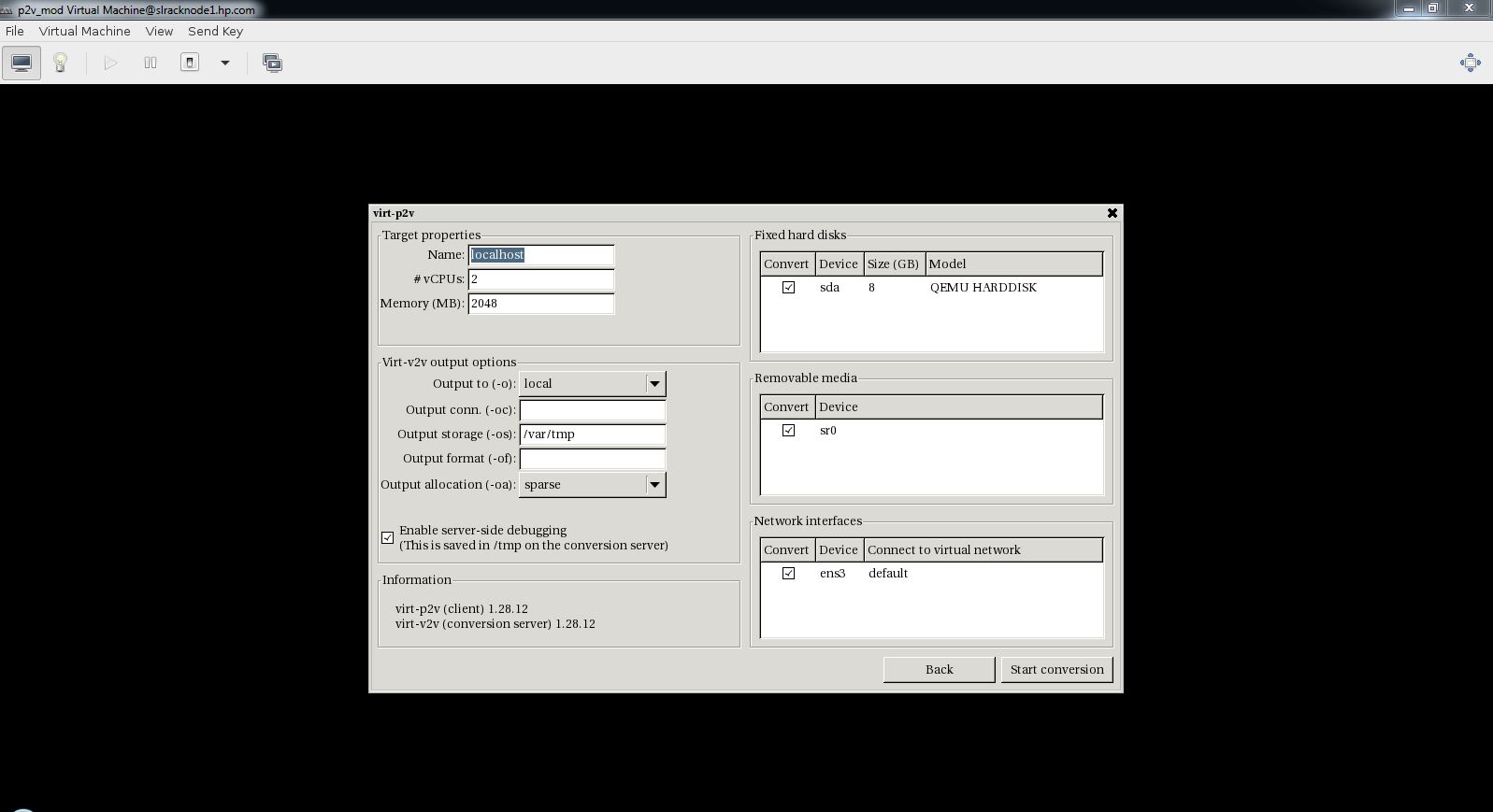
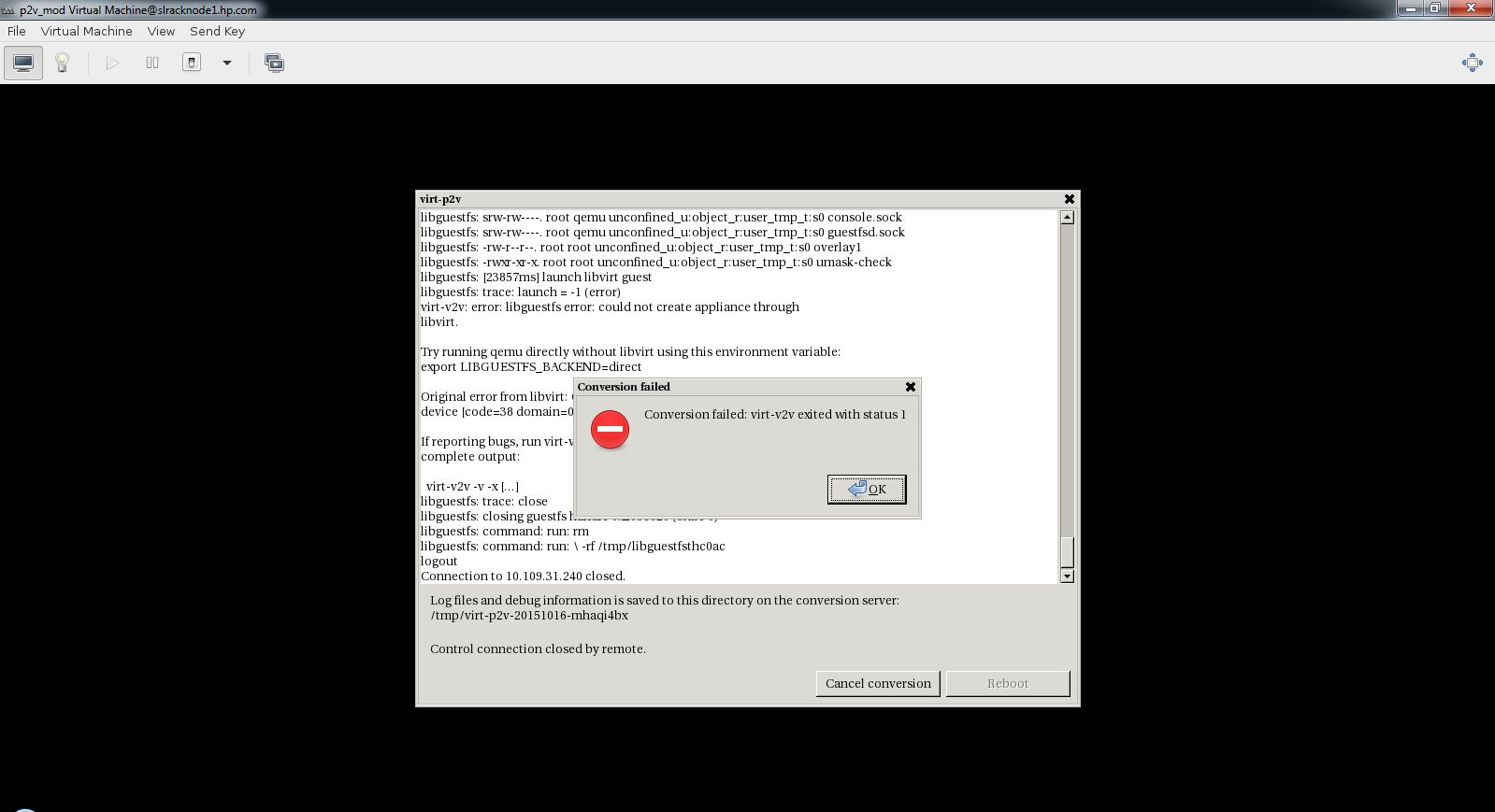
Hi Richard, We have generated .iso on Physical server and tried booting same with "livecd-p2v-*.iso", and we are getting "unexpected end of file waiting for password prompt" error. Also we are not able to execute "/sbin/ifconfig" or "ip a" binaries on Physical server after booting from livecd. We have attached "p2v.ks" file and "livecd-creator p2v.ks" logs for your reference. Hope it might be helpful. Thanks, Tejas On Tue, Nov 3, 2015 at 3:03 PM, Chengappa Changz <chengappa.mr@gmail.com> wrote:
Hello Rich, Greetings!
It was great connecting with you and, I would like to thank you for your time and being patient on answering all our queries.
However, referring to the link -> http://libguestfs.org/virt-p2v.1.html#how-virt-p2v-works we have a ambiguity -> i.e. under the section "GUI INTERACTIVE CONFIGURATION" we have "When you start virt-p2v, you'll see a graphical configuration dialog that walks you through connection to the conversion server,"
As of now we are using *virt-manager* to get this GUI INTERACTIVE CONFIGURATION as we are not sure if this is the correct way of invoking GUI,
Attaching the screen shots of the process till where we were *successful using the virt-manger*
It would be highly appreciated if you can let us know how we can invoke this interactive GUI with-out virt-manager so that we could proceed further with the conversion.
*Thanks & Regards,*
*Chengappa M.R*
Software Designer Network Function Virtualization | Communication Media Solutions
cm-r@hp.com M +91 944 934 9647 Hewlett Packard Company Bangalore, India.
Please print thoughtfully
On 3 November 2015 at 04:45, Richard W.M. Jones <rjones@redhat.com> wrote:
On Mon, Nov 02, 2015 at 10:59:35PM +0000, Richard W.M. Jones wrote:
On Mon, Nov 02, 2015 at 06:51:20PM +0530, Ravi Chaudhary wrote:
Sorry, attached herein is the screenshot
This error "unexpected end of file waiting for password prompt" is this bug:
https://bugzilla.redhat.com/show_bug.cgi?id=1167916#c4
Although it is a bug in virt-p2v -- it should print a clearer error message -- what it really means in this case is that you've got the wrong server name, user or password, or that virt-p2v is unable to contact the server (perhaps because of firewall or network problems).
And by "server", of course I mean the virt-v2v conversion server.
Rich.
-- Richard Jones, Virtualization Group, Red Hat http://people.redhat.com/~rjones Read my programming and virtualization blog: http://rwmj.wordpress.com virt-df lists disk usage of guests without needing to install any software inside the virtual machine. Supports Linux and Windows. http://people.redhat.com/~rjones/virt-df/
On Tue, Nov 03, 2015 at 03:03:21PM +0530, Chengappa Changz wrote:
Hello Rich, Greetings!
It was great connecting with you and, I would like to thank you for your time and being patient on answering all our queries.
However, referring to the link -> http://libguestfs.org/virt-p2v.1.html#how-virt-p2v-works we have a ambiguity -> i.e. under the section "GUI INTERACTIVE CONFIGURATION" we have "When you start virt-p2v, you'll see a graphical configuration dialog that walks you through connection to the conversion server,"
Have a look at what I wrote here: https://www.redhat.com/archives/libguestfs/2015-November/msg00015.html which will show you how you can diagnose the real problem.
As of now we are using *virt-manager* to get this GUI INTERACTIVE CONFIGURATION as we are not sure if this is the correct way of invoking GUI,
While you can use virt-manager for testing things, that's not the correct way to run virt-p2v to convert a physical machine. Rich.
Attaching the screen shots of the process till where we were *successful using the virt-manger*
It would be highly appreciated if you can let us know how we can invoke this interactive GUI with-out virt-manager so that we could proceed further with the conversion.
*Thanks & Regards,*
*Chengappa M.R*
Software Designer Network Function Virtualization | Communication Media Solutions
cm-r@hp.com M +91 944 934 9647 Hewlett Packard Company Bangalore, India.
Please print thoughtfully
On 3 November 2015 at 04:45, Richard W.M. Jones <rjones@redhat.com> wrote:
On Mon, Nov 02, 2015 at 10:59:35PM +0000, Richard W.M. Jones wrote:
On Mon, Nov 02, 2015 at 06:51:20PM +0530, Ravi Chaudhary wrote:
Sorry, attached herein is the screenshot
This error "unexpected end of file waiting for password prompt" is this bug:
https://bugzilla.redhat.com/show_bug.cgi?id=1167916#c4
Although it is a bug in virt-p2v -- it should print a clearer error message -- what it really means in this case is that you've got the wrong server name, user or password, or that virt-p2v is unable to contact the server (perhaps because of firewall or network problems).
And by "server", of course I mean the virt-v2v conversion server.
Rich.
-- Richard Jones, Virtualization Group, Red Hat http://people.redhat.com/~rjones Read my programming and virtualization blog: http://rwmj.wordpress.com virt-df lists disk usage of guests without needing to install any software inside the virtual machine. Supports Linux and Windows. http://people.redhat.com/~rjones/virt-df/
-- Richard Jones, Virtualization Group, Red Hat http://people.redhat.com/~rjones Read my programming and virtualization blog: http://rwmj.wordpress.com virt-p2v converts physical machines to virtual machines. Boot with a live CD or over the network (PXE) and turn machines into KVM guests. http://libguestfs.org/virt-v2v
Hi Richard, Thanks for your response, We have followed the steps mentioned in https://www.redhat.com/archives/libguestfs/2015-November/msg00015.html Now we are able to connect the V2V Conversion Server from Physical server after booting from livecd. Once ssh connection established, "Start Conversion" opens up another UI which has necessary info. of hardware (eg. CPU, RAM, HDD Capacity, No. of NICs etc..) After starting conversation, at the time of decompressing kernel, after loading modules by iso we are getting below error, *file -zb /sysroot/lib/modules/3.17.4-301.fc21.x86_64/kernel/arch/x86/crypto/blowfish-x86_64.ko.xz* *libguestfs: trace: file = "XZ compressed data"* *libguestfs: trace: file_architecture = NULL (error)* *virt-v2v: error: libguestfs error: file_architecture: unknown architecture: * */lib/modules/3.17.4-301.fc21.x86_64/kernel/arch/x86/crypto/blowfish-x86_64.ko.xz* *If reporting bugs, run virt-v2v with debugging enabled and include the * *complete output:* * virt-v2v -v -x [...]* *libguestfs: trace: close* *libguestfs: closing guestfs handle 0xb7aea0 (state 2)* *libguestfs: trace: internal_autosync* It would be very helpful if you can provide some pointers on this. I have attached log file for reference. Thanks, Tejas On Tue, Nov 3, 2015 at 7:01 AM, Richard W.M. Jones <rjones@redhat.com> wrote:
Hello Rich, Greetings!
It was great connecting with you and, I would like to thank you for your time and being patient on answering all our queries.
However, referring to the link -> http://libguestfs.org/virt-p2v.1.html#how-virt-p2v-works we have a ambiguity -> i.e. under the section "GUI INTERACTIVE CONFIGURATION" we have "When you start virt-p2v, you'll see a graphical configuration dialog
On Tue, Nov 03, 2015 at 03:03:21PM +0530, Chengappa Changz wrote: that
walks you through connection to the conversion server,"
Have a look at what I wrote here:
https://www.redhat.com/archives/libguestfs/2015-November/msg00015.html
which will show you how you can diagnose the real problem.
As of now we are using *virt-manager* to get this GUI INTERACTIVE CONFIGURATION as we are not sure if this is the correct way of invoking GUI,
While you can use virt-manager for testing things, that's not the correct way to run virt-p2v to convert a physical machine.
Rich.
Attaching the screen shots of the process till where we were *successful using the virt-manger*
It would be highly appreciated if you can let us know how we can invoke this interactive GUI with-out virt-manager so that we could proceed further with the conversion.
*Thanks & Regards,*
*Chengappa M.R*
Software Designer Network Function Virtualization | Communication Media Solutions
cm-r@hp.com M +91 944 934 9647 Hewlett Packard Company Bangalore, India.
Please print thoughtfully
On 3 November 2015 at 04:45, Richard W.M. Jones <rjones@redhat.com> wrote:
On Mon, Nov 02, 2015 at 10:59:35PM +0000, Richard W.M. Jones wrote:
On Mon, Nov 02, 2015 at 06:51:20PM +0530, Ravi Chaudhary wrote:
Sorry, attached herein is the screenshot
This error "unexpected end of file waiting for password prompt" is this bug:
https://bugzilla.redhat.com/show_bug.cgi?id=1167916#c4
Although it is a bug in virt-p2v -- it should print a clearer error message -- what it really means in this case is that you've got the wrong server name, user or password, or that virt-p2v is unable to contact the server (perhaps because of firewall or network problems).
And by "server", of course I mean the virt-v2v conversion server.
Rich.
-- Richard Jones, Virtualization Group, Red Hat http://people.redhat.com/~rjones Read my programming and virtualization blog: http://rwmj.wordpress.com virt-df lists disk usage of guests without needing to install any software inside the virtual machine. Supports Linux and Windows. http://people.redhat.com/~rjones/virt-df/
-- Richard Jones, Virtualization Group, Red Hat http://people.redhat.com/~rjones Read my programming and virtualization blog: http://rwmj.wordpress.com virt-p2v converts physical machines to virtual machines. Boot with a live CD or over the network (PXE) and turn machines into KVM guests. http://libguestfs.org/virt-v2v
On Wed, Nov 04, 2015 at 06:08:16AM -0800, Tejas Gadaria wrote:
After starting conversation, at the time of decompressing kernel, after loading modules by iso we are getting below error,
*file -zb /sysroot/lib/modules/3.17.4-301.fc21.x86_64/kernel/arch/x86/crypto/blowfish-x86_64.ko.xz* *libguestfs: trace: file = "XZ compressed data"* *libguestfs: trace: file_architecture = NULL (error)* *virt-v2v: error: libguestfs error: file_architecture: unknown architecture: * */lib/modules/3.17.4-301.fc21.x86_64/kernel/arch/x86/crypto/blowfish-x86_64.ko.xz*
This was fixed upstream: https://github.com/libguestfs/libguestfs/commit/7291b226d1b08c762ae2f2715a2a... With a more recent virt-v2v it will work fine, as in this example: $ virt-builder fedora-22 $ guestfish --ro -a fedora-22.img -i find /lib/modules | grep xz | head /4.0.4-301.fc22.x86_64/kernel/arch/x86/crypto/blowfish-x86_64.ko.xz /4.0.4-301.fc22.x86_64/kernel/arch/x86/crypto/camellia-aesni-avx-x86_64.ko.xz /4.0.4-301.fc22.x86_64/kernel/arch/x86/crypto/camellia-aesni-avx2.ko.xz /4.0.4-301.fc22.x86_64/kernel/arch/x86/crypto/camellia-x86_64.ko.xz /4.0.4-301.fc22.x86_64/kernel/arch/x86/crypto/cast5-avx-x86_64.ko.xz /4.0.4-301.fc22.x86_64/kernel/arch/x86/crypto/cast6-avx-x86_64.ko.xz /4.0.4-301.fc22.x86_64/kernel/arch/x86/crypto/crc32-pclmul.ko.xz /4.0.4-301.fc22.x86_64/kernel/arch/x86/crypto/crc32c-intel.ko.xz /4.0.4-301.fc22.x86_64/kernel/arch/x86/crypto/crct10dif-pclmul.ko.xz /4.0.4-301.fc22.x86_64/kernel/arch/x86/crypto/des3_ede-x86_64.ko.xz $ virt-v2v -i disk fedora-22.img -o null [ 0.0] Opening the source -i disk fedora-22.img [ 0.1] Creating an overlay to protect the source from being modified [ 0.6] Initializing the target -o null [ 0.6] Opening the overlay [ 17.0] Inspecting the overlay [ 19.7] Checking for sufficient free disk space in the guest [ 19.7] Estimating space required on target for each disk [ 19.7] Converting Fedora 22 (Twenty Two) to run on KVM virt-v2v: warning: /files/boot/grub2/device.map/hd0 references unknown device "vda". You may have to fix this entry manually after conversion. virt-v2v: This guest has virtio drivers installed. [ 37.3] Mapping filesystem data to avoid copying unused and blank areas [ 38.2] Closing the overlay [ 38.4] Checking if the guest needs BIOS or UEFI to boot [ 38.4] Assigning disks to buses [ 38.4] Copying disk 1/1 to /var/tmp/null.5APlFC/sda (raw) (100.00/100%) [ 39.5] Creating output metadata [ 39.5] Finishing off Rich. -- Richard Jones, Virtualization Group, Red Hat http://people.redhat.com/~rjones Read my programming and virtualization blog: http://rwmj.wordpress.com virt-builder quickly builds VMs from scratch http://libguestfs.org/virt-builder.1.html
Greetings Richard, Thanks a ton for the pointers. We have finally accomplished the conversion, after upgrading the Conversion server to FC 22. Appreciate your support. Regards, Ravi C On Wed, Nov 4, 2015 at 9:35 PM, Richard W.M. Jones <rjones@redhat.com> wrote:
On Wed, Nov 04, 2015 at 06:08:16AM -0800, Tejas Gadaria wrote:
After starting conversation, at the time of decompressing kernel, after loading modules by iso we are getting below error,
*file -zb
/sysroot/lib/modules/3.17.4-301.fc21.x86_64/kernel/arch/x86/crypto/blowfish-x86_64.ko.xz*
*libguestfs: trace: file = "XZ compressed data"* *libguestfs: trace: file_architecture = NULL (error)* *virt-v2v: error: libguestfs error: file_architecture: unknown architecture: *
*/lib/modules/3.17.4-301.fc21.x86_64/kernel/arch/x86/crypto/blowfish-x86_64.ko.xz*
This was fixed upstream:
https://github.com/libguestfs/libguestfs/commit/7291b226d1b08c762ae2f2715a2a...
With a more recent virt-v2v it will work fine, as in this example:
$ virt-builder fedora-22
$ guestfish --ro -a fedora-22.img -i find /lib/modules | grep xz | head /4.0.4-301.fc22.x86_64/kernel/arch/x86/crypto/blowfish-x86_64.ko.xz
/4.0.4-301.fc22.x86_64/kernel/arch/x86/crypto/camellia-aesni-avx-x86_64.ko.xz /4.0.4-301.fc22.x86_64/kernel/arch/x86/crypto/camellia-aesni-avx2.ko.xz /4.0.4-301.fc22.x86_64/kernel/arch/x86/crypto/camellia-x86_64.ko.xz /4.0.4-301.fc22.x86_64/kernel/arch/x86/crypto/cast5-avx-x86_64.ko.xz /4.0.4-301.fc22.x86_64/kernel/arch/x86/crypto/cast6-avx-x86_64.ko.xz /4.0.4-301.fc22.x86_64/kernel/arch/x86/crypto/crc32-pclmul.ko.xz /4.0.4-301.fc22.x86_64/kernel/arch/x86/crypto/crc32c-intel.ko.xz /4.0.4-301.fc22.x86_64/kernel/arch/x86/crypto/crct10dif-pclmul.ko.xz /4.0.4-301.fc22.x86_64/kernel/arch/x86/crypto/des3_ede-x86_64.ko.xz
$ virt-v2v -i disk fedora-22.img -o null [ 0.0] Opening the source -i disk fedora-22.img [ 0.1] Creating an overlay to protect the source from being modified [ 0.6] Initializing the target -o null [ 0.6] Opening the overlay [ 17.0] Inspecting the overlay [ 19.7] Checking for sufficient free disk space in the guest [ 19.7] Estimating space required on target for each disk [ 19.7] Converting Fedora 22 (Twenty Two) to run on KVM virt-v2v: warning: /files/boot/grub2/device.map/hd0 references unknown device "vda". You may have to fix this entry manually after conversion. virt-v2v: This guest has virtio drivers installed. [ 37.3] Mapping filesystem data to avoid copying unused and blank areas [ 38.2] Closing the overlay [ 38.4] Checking if the guest needs BIOS or UEFI to boot [ 38.4] Assigning disks to buses [ 38.4] Copying disk 1/1 to /var/tmp/null.5APlFC/sda (raw) (100.00/100%) [ 39.5] Creating output metadata [ 39.5] Finishing off
Rich.
-- Richard Jones, Virtualization Group, Red Hat http://people.redhat.com/~rjones Read my programming and virtualization blog: http://rwmj.wordpress.com virt-builder quickly builds VMs from scratch http://libguestfs.org/virt-builder.1.html
On Mon, Nov 02, 2015 at 06:50:00PM +0530, Ravi Chaudhary wrote:
Greetings Richard,
Thanks for the pointer. It was helpful. (Note: We have 2 physical machines, one is p2v machine & the other is conversion server. Both the machines have been updated with "*yum install qemu libvirt-client virt-manager virt-viewer guestfish libguestfs-tools virt-top*")
We have couple of questions for the exact functioning of virt-p2v:
1. We are unable to locate the following command for injecting the ssh private key of p2v machine:
*virt-p2v-make-kickstart p2v.ks --inject-ssh-identity id_rsa* *virt-p2v-make-kickstart: unrecognized option '--inject-ssh-identity'*
This is a new (and useful) feature, but I'm afraid it's not available until RHEL 7.3 or Fedora >= 24.
2. *Further we are also unable to find any executable "virt-p2v" on the p2v machine*
You shouldn't run virt-p2v directly. You have to boot the ISO on the physical machine.
3. *We are able to view the virt-p2v in GUI mode, only after booting the hardware using the ISO image, generated on p2v machine (The hardware used for booting is the same physical p2v machine). Is this the right way? We are observing the following error:*
I'm not clear what this paragraph means.
*Would you be able to provide us with exact steps required to implement the virt-p2v? *
It's all described here: http://libguestfs.org/virt-p2v.1.html Rich. -- Richard Jones, Virtualization Group, Red Hat http://people.redhat.com/~rjones Read my programming and virtualization blog: http://rwmj.wordpress.com libguestfs lets you edit virtual machines. Supports shell scripting, bindings from many languages. http://libguestfs.org
On Sun, Nov 01, 2015 at 09:23:28AM +0530, Tejas Gadaria wrote:
Hi Richard,
Thanks for your replay,
We are using Fedora 21 with SAS drive and RAID 0 config on both Physical and conversion server.
We're going to need a bit more information about the hardware in the physical server, like what 'RAID 0' means - hardware RAID? What precise RAID controller hardware? My other advice would be to log in to the virt-p2v shell (it's on one of the other consoles, like Alt+Ctrl+F2) and run 'dmesg' to see what hardware the virt-p2v kernel is seeing. If possible, copy 'dmesg' off and post that. Note I don't care about the conversion server - it is unlikely to be the problem. Rich. -- Richard Jones, Virtualization Group, Red Hat http://people.redhat.com/~rjones Read my programming and virtualization blog: http://rwmj.wordpress.com virt-builder quickly builds VMs from scratch http://libguestfs.org/virt-builder.1.html

Hello Richard, Thanks a lot for your time and response. Please find the requested details attached. RAID-0 is the software raid level which we have configured on the HP BL Gen8 server. (While creating 1 Logical drive out of 2 physical drives ) Best, Shree. On Sun, Nov 1, 2015 at 12:49 PM, Richard W.M. Jones <rjones@redhat.com> wrote:
On Sun, Nov 01, 2015 at 09:23:28AM +0530, Tejas Gadaria wrote:
Hi Richard,
Thanks for your replay,
We are using Fedora 21 with SAS drive and RAID 0 config on both Physical and conversion server.
We're going to need a bit more information about the hardware in the physical server, like what 'RAID 0' means - hardware RAID? What precise RAID controller hardware?
My other advice would be to log in to the virt-p2v shell (it's on one of the other consoles, like Alt+Ctrl+F2) and run 'dmesg' to see what hardware the virt-p2v kernel is seeing. If possible, copy 'dmesg' off and post that.
Note I don't care about the conversion server - it is unlikely to be the problem.
Rich.
-- Richard Jones, Virtualization Group, Red Hat http://people.redhat.com/~rjones Read my programming and virtualization blog: http://rwmj.wordpress.com virt-builder quickly builds VMs from scratch http://libguestfs.org/virt-builder.1.html
Minor Correction, Yes, we are using Hardware RAID-0, which uses HP Smart Array P220i Controller. Thanks, Tejas On Mon, Nov 2, 2015 at 3:48 AM, SHREE DUTH Awasthi < shreeduth.awasthi@gmail.com> wrote:
Hello Richard,
Thanks a lot for your time and response. Please find the requested details attached.
RAID-0 is the software raid level which we have configured on the HP BL Gen8 server. (While creating 1 Logical drive out of 2 physical drives )
Best, Shree.
On Sun, Nov 1, 2015 at 12:49 PM, Richard W.M. Jones <rjones@redhat.com> wrote:
On Sun, Nov 01, 2015 at 09:23:28AM +0530, Tejas Gadaria wrote:
Hi Richard,
Thanks for your replay,
We are using Fedora 21 with SAS drive and RAID 0 config on both Physical and conversion server.
We're going to need a bit more information about the hardware in the physical server, like what 'RAID 0' means - hardware RAID? What precise RAID controller hardware?
My other advice would be to log in to the virt-p2v shell (it's on one of the other consoles, like Alt+Ctrl+F2) and run 'dmesg' to see what hardware the virt-p2v kernel is seeing. If possible, copy 'dmesg' off and post that.
Note I don't care about the conversion server - it is unlikely to be the problem.
Rich.
-- Richard Jones, Virtualization Group, Red Hat http://people.redhat.com/~rjones Read my programming and virtualization blog: http://rwmj.wordpress.com virt-builder quickly builds VMs from scratch http://libguestfs.org/virt-builder.1.html
participants (5)
-
 Chengappa Changz
 -
 Ravi Chaudhary
 -
 Richard W.M. Jones
 -
 SHREE DUTH Awasthi
 -
 Tejas Gadaria