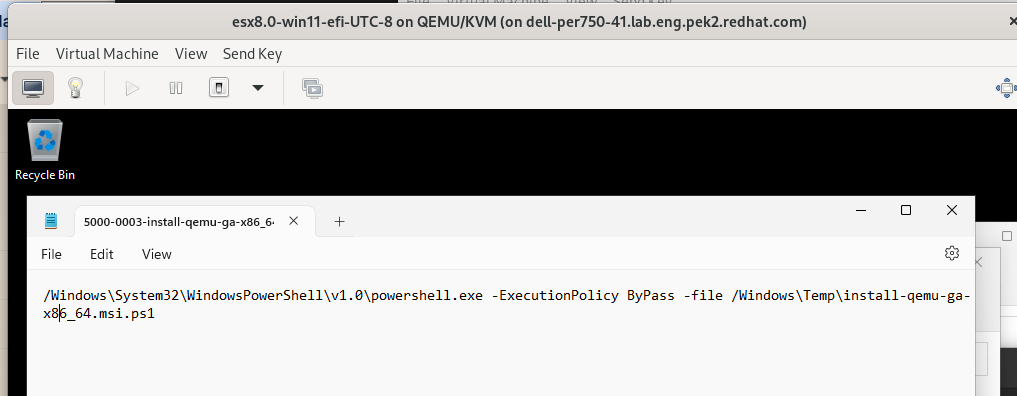
Hi Richard, On Thu, Sep 28, 2023 at 1:02 AM Richard W.M. Jones <rjones@redhat.com> wrote:
On Wed, Sep 27, 2023 at 08:46:58PM +0800, Ming Xie wrote:
Hi Richard,
Sorry, I missed the email, I found out that the ova OS used by the customer is win11 uefi, so I tried to reproduce the error today using win11-uefi guest
Steps: 1. Convert win10-efi with UTC-8 timezone, win11-non-efi with UTC-8 timezone, win11-efi with UTC-8 timezone, win11-efi with UTC+8 timezone, win2022-efi with UTC-8 timezone from VMware by v2v, then check the installation status after finishing conversion
Summary the test result as below:
qemu-ga
Win10-efi-UTC-8 PASS Win11-non-efi UTC-8 PASS Win11-efi-UTC-8 FAIL(can't find qemu-ga log in c:\) Win11-efi-UTC+8 FAIL(can't find qemu-ga log in c:\) Win2022-efi-UTC-8 PASS
Thanks for testing. The symptoms look the same as Lee reported.
You're running virt-v2v from RHEL 9? If so I will prepare a scratch RHEL 9 package with the patches which we think might fix this, for testing.
Yes, I reproduced the problem using rhel9 virt-v2v, because I saw that the customer was also using rhel9 virt-v2v (version: 2.2), I saw that you wanted to solve the problem by fixing the date of the schtask command, but I see that the schtask command used to install qemu-ga has been changed to the one shown in "qemu-ga-command-rhel9.png" on rhel9 Besides, qemu-ga can be installed successfully after converting win11-efi -UTC-8 guest on rhel8.9, which means I cannot reproduce the issue on rhel8 and the schtask command used for installing qemu-ga is old one as '' qemu-ga-command-rhel8.png' ' shown on rhel8.9, so I'm not sure if the fix can be work with rhel9 virt-v2v Regards Ming Xie