Re: [Libguestfs] oVirt import from VMware

[Adding upstream mailing list] On Mon, May 17, 2021 at 12:32:12PM -0400, Alan Daniels wrote:
> Thanks Martin. The logs (/var/log/vdsm/import on the host) show: > > qemu-img: /var/tmp/v2vovle5b34c.qcow2: CURL: Error opening file: > Server does not support 'range' (byte ranges).
This is unexpected, but I'd need to see the full log to be sure.
Given the little information available (but it's vCenter 7 so it would fit), it could be:
https://bugzilla.redhat.com/show_bug.cgi?id=1846238 https://bugzilla.redhat.com/show_bug.cgi?id=1841038
(They're the same bug, we didn't fix it in RHEL 7) Hey Rich,
Thanks for the help! Some more info about the environment:
Oracle Linux 7.9 # cat /etc/redhat-release Red Hat Enterprise Linux Server release 7.9 (Maipo)
OLVM / oVirt 4.3
virt-v2v.x86_64 1:1.40.2-10.0.1.el7 libguestfs.x86_64 1:1.40.2-10.0.1.el7 qemu-kvm.x86_64 15:4.2.1-6.el7 nbdkit.x86_64 1.8.0-4.el7 qemu-block-curl.x86_64 15:4.2.1-6.el7
Running on Oracle Cloud.
VMware is on another cloud provider and they're connected via VPN.
The logs looks essentially the same as the one from https://bugzilla.redhat.com /show_bug.cgi?id=1846238
I can't really upgrade from 7.9 to 8.3, so is this expected behavior? Are there some potential workarounds?
It's a bug in qemu which you will need to patch in order to do the import using this method. Other methods don't suffer from the bug because they don't use qemu in the same way. I would recommend exploring the “-i ova” method. Rich. -- Richard Jones, Virtualization Group, Red Hat http://people.redhat.com/~rjones Read my programming and virtualization blog: http://rwmj.wordpress.com libguestfs lets you edit virtual machines. Supports shell scripting, bindings from many languages. http://libguestfs.org

Directly importing from VMware would be desirable to not have a 2-step process. I'll look into updating. And just to confirm - it still has to go through vCenter right? (Can't go directly to the ESXi host). I tried the OVA method where I exported the VM using VMware's ovftool directly to the new KVM host. However, importing this local OVA (with the oVirt GUI rather than virt-v2v on the command line) still failed. " virt-v2v: error: inspection could not detect the source guest (or physical machine). Assuming that you are running virt-v2v/virt-p2v on a source which is supported (and not, for example, a blank disk), then this should not happen. No root device found in this operating system image. " Attached the import log. Thanks! - Alan On Mon, May 17, 2021 at 1:35 PM Richard W.M. Jones <rjones@redhat.com> wrote:
[Adding upstream mailing list]
On Mon, May 17, 2021 at 12:32:12PM -0400, Alan Daniels wrote:
> Thanks Martin. The logs (/var/log/vdsm/import on the
host)
show: > > qemu-img: /var/tmp/v2vovle5b34c.qcow2: CURL: Error
opening
file: > Server does not support 'range' (byte ranges).
This is unexpected, but I'd need to see the full log to be sure.
Given the little information available (but it's vCenter 7 so it
would
fit), it could be:
https://bugzilla.redhat.com/show_bug.cgi?id=1846238 https://bugzilla.redhat.com/show_bug.cgi?id=1841038
(They're the same bug, we didn't fix it in RHEL 7) Hey Rich,
Thanks for the help! Some more info about the environment:
Oracle Linux 7.9 # cat /etc/redhat-release Red Hat Enterprise Linux Server release 7.9 (Maipo)
OLVM / oVirt 4.3
virt-v2v.x86_64 1:1.40.2-10.0.1.el7 libguestfs.x86_64 1:1.40.2-10.0.1.el7 qemu-kvm.x86_64 15:4.2.1-6.el7 nbdkit.x86_64 1.8.0-4.el7 qemu-block-curl.x86_64 15:4.2.1-6.el7
Running on Oracle Cloud.
VMware is on another cloud provider and they're connected via VPN.
The logs looks essentially the same as the one from
/show_bug.cgi?id=1846238
I can't really upgrade from 7.9 to 8.3, so is this expected behavior? Are there some potential workarounds?
It's a bug in qemu which you will need to patch in order to do the import using this method.
Other methods don't suffer from the bug because they don't use qemu in the same way. I would recommend exploring the “-i ova” method.
Rich.
-- Richard Jones, Virtualization Group, Red Hat http://people.redhat.com/~rjones Read my programming and virtualization blog: http://rwmj.wordpress.com libguestfs lets you edit virtual machines. Supports shell scripting, bindings from many languages. http://libguestfs.org
On Wed, May 19, 2021 at 01:40:04PM -0400, Alan Daniels wrote:
Directly importing from VMware would be desirable to not have a 2-step process. I'll look into updating.
And just to confirm - it still has to go through vCenter right? (Can't go directly to the ESXi host).
It can import directly from ESXi, although you'll have to use the VDDK method which involves using some software from VMware with a non-libre license. This is all detailed in the manual: https://libguestfs.org/virt-v2v-input-vmware.1.html
I tried the OVA method where I exported the VM using VMware's ovftool directly to the new KVM host. However, importing this local OVA (with the oVirt GUI rather than virt-v2v on the command line) still failed.
" virt-v2v: error: inspection could not detect the source guest (or physical machine).
Thanks for attaching the log. It shows that virt-v2v found a single disk with two partitions, but it couldn't make sense of what was on the disk. In particular it seems as if the second partition doesn't have C:\windows\system32\cmd.exe ? If this was missing it would be enough to confuse virt-v2v into thinking there is no system partition. If you didn't delete the file then it might be some obscure Windows version we've not seen before, or some problem with ntfs-3g. Rich. -- Richard Jones, Virtualization Group, Red Hat http://people.redhat.com/~rjones Read my programming and virtualization blog: http://rwmj.wordpress.com virt-df lists disk usage of guests without needing to install any software inside the virtual machine. Supports Linux and Windows. http://people.redhat.com/~rjones/virt-df/
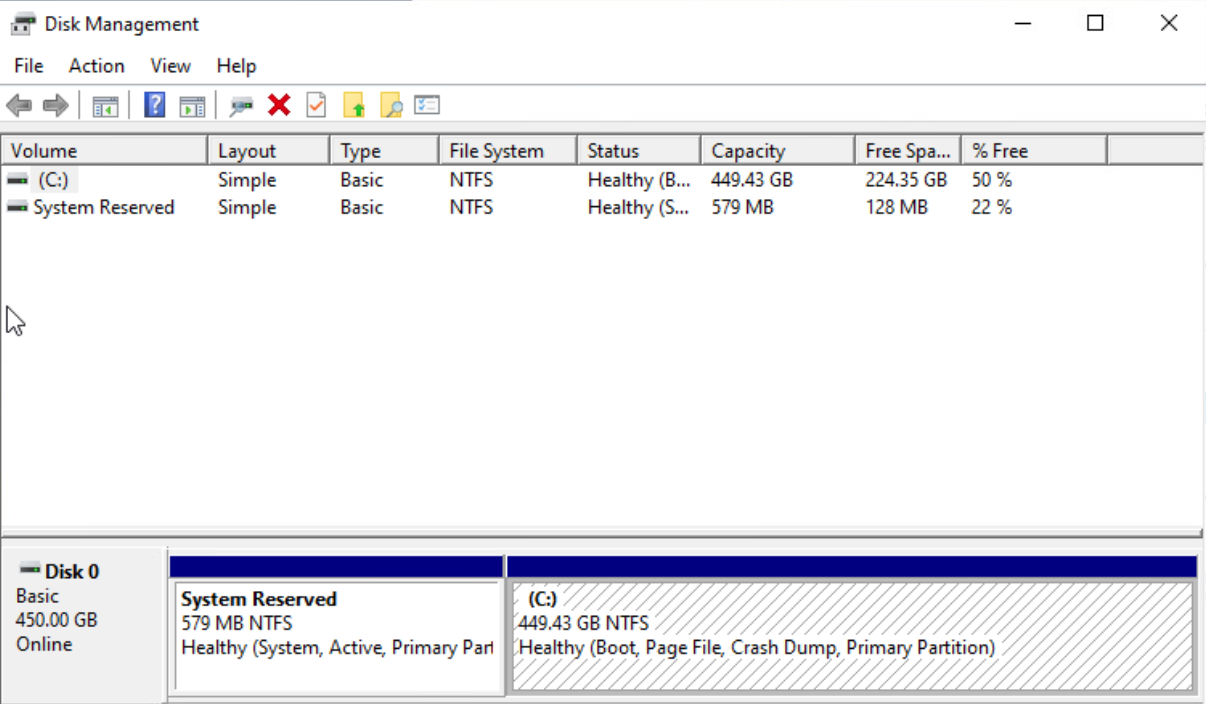
Thanks, I'll look into VDDK. Attached a screenshot of the disk from the VM's perspective. C:\windows\system32\cmd.exe definitely exists (confirmed it). It's Windows 10 (Microsoft Windows 10 x64 from VMware's point of view) - build 2004 19041.985. Maybe the file transfer had an issue (running ovftool), since the resulting OVA file was 128 GB, while the VM is 450 GB thick provisioned with more than 128 GB in use. What would the expected OVA size be here? ovftool did say that the transfer completed successfully and I've run it twice where it stopped at 128 GB both times. [image: image.png] Text version of the screenshot: Disk 0 - 450 GB 579 MB NTFS System Reserved partition 449.43 GB C drive partition Thanks! - Alan On Wed, May 19, 2021 at 3:55 PM Richard W.M. Jones <rjones@redhat.com> wrote:
Directly importing from VMware would be desirable to not have a 2-step
On Wed, May 19, 2021 at 01:40:04PM -0400, Alan Daniels wrote: process.
I'll look into updating.
And just to confirm - it still has to go through vCenter right? (Can't go directly to the ESXi host).
It can import directly from ESXi, although you'll have to use the VDDK method which involves using some software from VMware with a non-libre license. This is all detailed in the manual:
https://libguestfs.org/virt-v2v-input-vmware.1.html
I tried the OVA method where I exported the VM using VMware's ovftool directly to the new KVM host. However, importing this local OVA (with the oVirt GUI rather than virt-v2v on the command line) still failed.
" virt-v2v: error: inspection could not detect the source guest (or physical machine).
Thanks for attaching the log. It shows that virt-v2v found a single disk with two partitions, but it couldn't make sense of what was on the disk. In particular it seems as if the second partition doesn't have C:\windows\system32\cmd.exe ? If this was missing it would be enough to confuse virt-v2v into thinking there is no system partition.
If you didn't delete the file then it might be some obscure Windows version we've not seen before, or some problem with ntfs-3g.
Rich.
-- Richard Jones, Virtualization Group, Red Hat http://people.redhat.com/~rjones Read my programming and virtualization blog: http://rwmj.wordpress.com virt-df lists disk usage of guests without needing to install any software inside the virtual machine. Supports Linux and Windows. http://people.redhat.com/~rjones/virt-df/
It looks like I've finally gotten some imports to work. Not with the 450 GB VM yet, but with some other VMs from the same VMware environment, which should have a similar config. The steps for me were: # export LIBGUESTFS_BACKEND=direct (not too sure if this is required) # ovftool vi://<vcenter_path_to_vm> /<some_local_directory>/<vm>.ova # chown 36:36 <vm>.ova and then importing via the oVirt GUI by setting Source: Virtual Appliance (OVA) and specifying the path to the ova on the host. The VM usually wouldn't boot right away (different errors for 2 different attempts), but after making some edit via oVirt and reverting, it would boot. I'm also not using virtio and don't have virtio drivers for Windows. Maybe that's something worth looking into though. Thanks! - Alan On Wed, May 19, 2021 at 6:37 PM Alan Daniels <alan@softdrive.co> wrote:
Thanks, I'll look into VDDK.
Attached a screenshot of the disk from the VM's perspective. C:\windows\system32\cmd.exe definitely exists (confirmed it). It's Windows 10 (Microsoft Windows 10 x64 from VMware's point of view) - build 2004 19041.985.
Maybe the file transfer had an issue (running ovftool), since the resulting OVA file was 128 GB, while the VM is 450 GB thick provisioned with more than 128 GB in use. What would the expected OVA size be here?
ovftool did say that the transfer completed successfully and I've run it twice where it stopped at 128 GB both times.
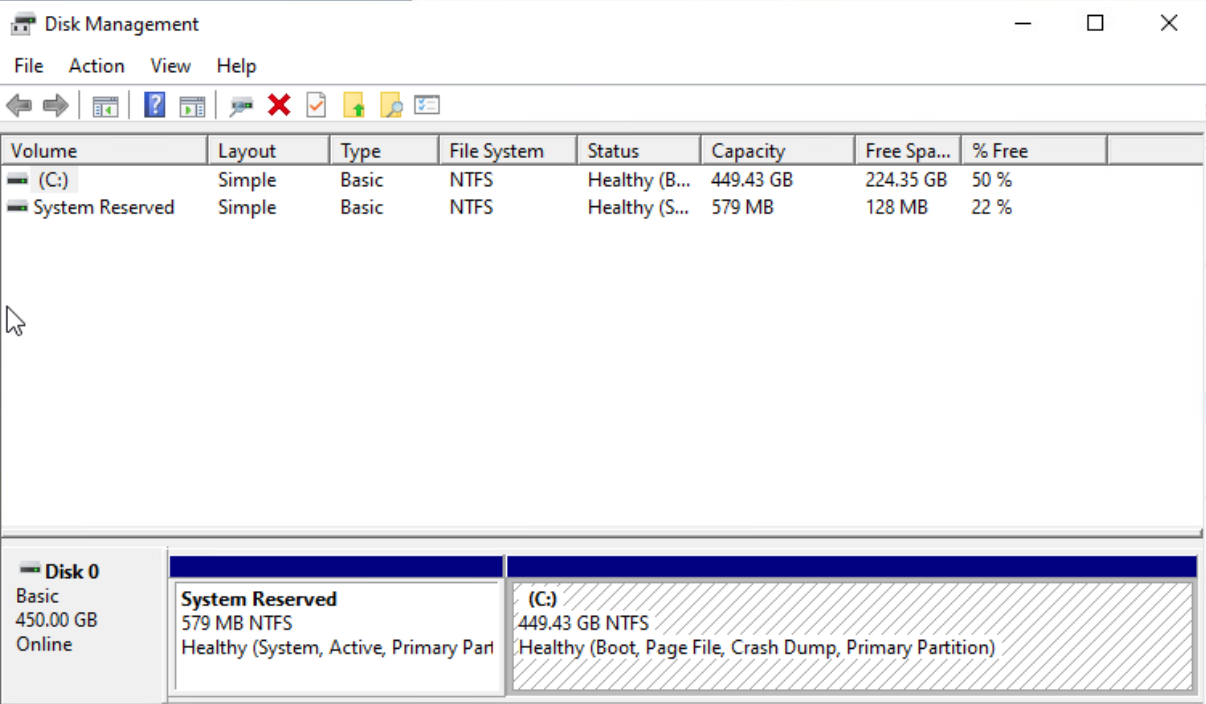
[image: image.png] Text version of the screenshot: Disk 0 - 450 GB 579 MB NTFS System Reserved partition 449.43 GB C drive partition
Thanks! - Alan
On Wed, May 19, 2021 at 3:55 PM Richard W.M. Jones <rjones@redhat.com> wrote:
Directly importing from VMware would be desirable to not have a 2-step
On Wed, May 19, 2021 at 01:40:04PM -0400, Alan Daniels wrote: process.
I'll look into updating.
And just to confirm - it still has to go through vCenter right? (Can't go directly to the ESXi host).
It can import directly from ESXi, although you'll have to use the VDDK method which involves using some software from VMware with a non-libre license. This is all detailed in the manual:
https://libguestfs.org/virt-v2v-input-vmware.1.html
I tried the OVA method where I exported the VM using VMware's ovftool directly to the new KVM host. However, importing this local OVA (with the oVirt GUI rather than virt-v2v on the command line) still failed.
" virt-v2v: error: inspection could not detect the source guest (or physical machine).
Thanks for attaching the log. It shows that virt-v2v found a single disk with two partitions, but it couldn't make sense of what was on the disk. In particular it seems as if the second partition doesn't have C:\windows\system32\cmd.exe ? If this was missing it would be enough to confuse virt-v2v into thinking there is no system partition.
If you didn't delete the file then it might be some obscure Windows version we've not seen before, or some problem with ntfs-3g.
Rich.
-- Richard Jones, Virtualization Group, Red Hat http://people.redhat.com/~rjones Read my programming and virtualization blog: http://rwmj.wordpress.com virt-df lists disk usage of guests without needing to install any software inside the virtual machine. Supports Linux and Windows. http://people.redhat.com/~rjones/virt-df/
Unfortunately this issue (or something similar) has resurfaced with another VM. Several VMs have worked. This Windows VM is failing to import, either via the oVirt GUI or running virt-v2v directly. Attached the log and here is the snippet that seems relevant to me. Rich, any suggestions here? Thanks! - Alan inspect_os: fses: fs: /dev/sda1 (ntfs) role: other fs: /dev/sda2 (ntfs) role: other inspect_get_roots: roots: guestfsd: => inspect_os (0x1e0) took 1.07 secs libguestfs: trace: v2v: inspect_os = [] virt-v2v: error: inspection could not detect the source guest (or physical machine). Assuming that you are running virt-v2v/virt-p2v on a source which is supported (and not, for example, a blank disk), then this should not happen. No root device found in this operating system image. Btw, I have to select Other OS in the oVirt GUI because when selecting Windows it complains about "Cannot import VM. Invalid time zone for given OS type" "Attribute: vm.vmStatic" On Sat, May 29, 2021 at 8:40 PM Alan Daniels <alan@softdrive.co> wrote:
It looks like I've finally gotten some imports to work. Not with the 450 GB VM yet, but with some other VMs from the same VMware environment, which should have a similar config.
The steps for me were: # export LIBGUESTFS_BACKEND=direct (not too sure if this is required) # ovftool vi://<vcenter_path_to_vm> /<some_local_directory>/<vm>.ova # chown 36:36 <vm>.ova
and then importing via the oVirt GUI by setting Source: Virtual Appliance (OVA) and specifying the path to the ova on the host.
The VM usually wouldn't boot right away (different errors for 2 different attempts), but after making some edit via oVirt and reverting, it would boot.
I'm also not using virtio and don't have virtio drivers for Windows. Maybe that's something worth looking into though.
Thanks! - Alan
On Wed, May 19, 2021 at 6:37 PM Alan Daniels <alan@softdrive.co> wrote:
Thanks, I'll look into VDDK.
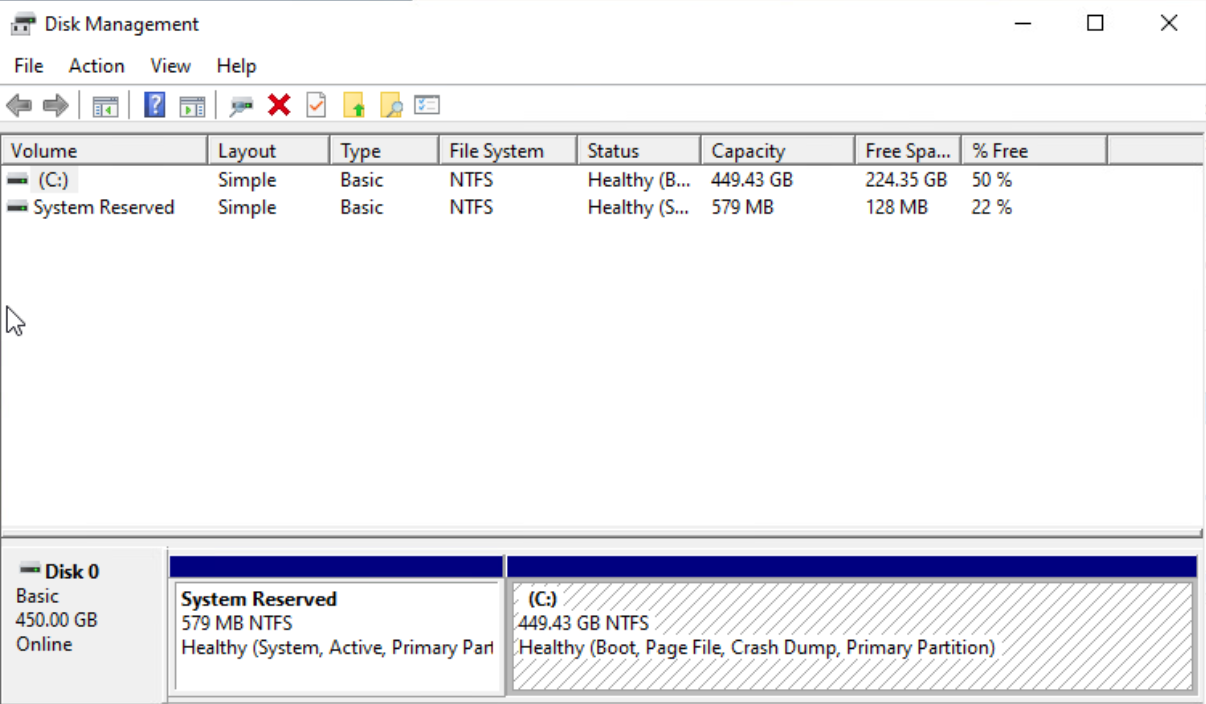
Attached a screenshot of the disk from the VM's perspective. C:\windows\system32\cmd.exe definitely exists (confirmed it). It's Windows 10 (Microsoft Windows 10 x64 from VMware's point of view) - build 2004 19041.985.
Maybe the file transfer had an issue (running ovftool), since the resulting OVA file was 128 GB, while the VM is 450 GB thick provisioned with more than 128 GB in use. What would the expected OVA size be here?
ovftool did say that the transfer completed successfully and I've run it twice where it stopped at 128 GB both times.
[image: image.png] Text version of the screenshot: Disk 0 - 450 GB 579 MB NTFS System Reserved partition 449.43 GB C drive partition
Thanks! - Alan
On Wed, May 19, 2021 at 3:55 PM Richard W.M. Jones <rjones@redhat.com> wrote:
Directly importing from VMware would be desirable to not have a 2-step
On Wed, May 19, 2021 at 01:40:04PM -0400, Alan Daniels wrote: process.
I'll look into updating.
And just to confirm - it still has to go through vCenter right? (Can't go directly to the ESXi host).
It can import directly from ESXi, although you'll have to use the VDDK method which involves using some software from VMware with a non-libre license. This is all detailed in the manual:
https://libguestfs.org/virt-v2v-input-vmware.1.html
I tried the OVA method where I exported the VM using VMware's ovftool directly to the new KVM host. However, importing this local OVA (with the oVirt GUI rather than virt-v2v on the command line) still failed.
" virt-v2v: error: inspection could not detect the source guest (or physical machine).
Thanks for attaching the log. It shows that virt-v2v found a single disk with two partitions, but it couldn't make sense of what was on the disk. In particular it seems as if the second partition doesn't have C:\windows\system32\cmd.exe ? If this was missing it would be enough to confuse virt-v2v into thinking there is no system partition.
If you didn't delete the file then it might be some obscure Windows version we've not seen before, or some problem with ntfs-3g.
Rich.
-- Richard Jones, Virtualization Group, Red Hat http://people.redhat.com/~rjones Read my programming and virtualization blog: http://rwmj.wordpress.com virt-df lists disk usage of guests without needing to install any software inside the virtual machine. Supports Linux and Windows. http://people.redhat.com/~rjones/virt-df/
On Thu, Jun 10, 2021 at 12:32:14PM -0400, Alan Daniels wrote:
Unfortunately this issue (or something similar) has resurfaced with another VM. Several VMs have worked.
This Windows VM is failing to import, either via the oVirt GUI or running virt-v2v directly. Attached the log and here is the snippet that seems relevant to me.
The log again indicates that C:\Windows\System32\cmd.exe is missing. As before I've no idea why this is. Could be something about the filesystem, ovftool, ntfs-3g, qemu's vmdk driver, etc. If you wanted to debug this you could try mounting the second partition of the disk with guestfish and seeing if the file exists. Anyway you will likely find the VDDK method is better. It's faster, doesn't involve doing multiple steps and it's the method that most customers prefer. https://libguestfs.org/virt-v2v-input-vmware.1.html#input-from-vddk Rich. -- Richard Jones, Virtualization Group, Red Hat http://people.redhat.com/~rjones Read my programming and virtualization blog: http://rwmj.wordpress.com libguestfs lets you edit virtual machines. Supports shell scripting, bindings from many languages. http://libguestfs.org
We configured the VDDK import method, and it works for some VMs, but it still has this "could not detect the source guest" error. It is convenient that the VDDK method is one step. Although a downside is that it doesn't really report the estimated completion time / progress. We needed to use VDDK6 since 7 wasn't working (this issue is fixed in RHEL8.x from my understanding). virt-v2v \ -v -x \ -ic "vpx://vsphere.local%5cadministrator@<vcenter>/Datacenter/<esxi>" \ -it vddk \ -io vddk-libdir=<path to vmware-vix-disklib-distrib> \ -io vddk-thumbprint=<thumbprint> \ "<VM name>" \ -o rhv-upload \ -oc <ovirt fqdn>/ovirt-engine/api \ -os <storage domain> \ -op <path to ovirt pw> \ -of raw \ -oo rhv-cafile=<path to ca.pem> \ -oo rhv-cluster=<cluster> I'll try comparing the VMX files for the passing/failing VMs and looking inside the guest OS. I'll also try this guestfish investigation. If you have any other suggestions though, please let me know. Thanks! - Alan On Thu, Jun 10, 2021 at 12:55 PM Richard W.M. Jones <rjones@redhat.com> wrote:
On Thu, Jun 10, 2021 at 12:32:14PM -0400, Alan Daniels wrote:
Unfortunately this issue (or something similar) has resurfaced with another VM. Several VMs have worked.
This Windows VM is failing to import, either via the oVirt GUI or running virt-v2v directly. Attached the log and here is the snippet that seems relevant to me.
The log again indicates that C:\Windows\System32\cmd.exe is missing. As before I've no idea why this is. Could be something about the filesystem, ovftool, ntfs-3g, qemu's vmdk driver, etc. If you wanted to debug this you could try mounting the second partition of the disk with guestfish and seeing if the file exists.
Anyway you will likely find the VDDK method is better. It's faster, doesn't involve doing multiple steps and it's the method that most customers prefer.
https://libguestfs.org/virt-v2v-input-vmware.1.html#input-from-vddk
Rich.
-- Richard Jones, Virtualization Group, Red Hat http://people.redhat.com/~rjones Read my programming and virtualization blog: http://rwmj.wordpress.com libguestfs lets you edit virtual machines. Supports shell scripting, bindings from many languages. http://libguestfs.org
On Sun, Jun 13, 2021 at 10:54:04PM -0400, Alan Daniels wrote:
We configured the VDDK import method, and it works for some VMs, but it still has this "could not detect the source guest" error.
I need to see the full virt-v2v -v -x import log for any error, otherwise I can't say what went wrong. Also would it be possible to upload one of the failing guests somewhere? (as an OVA file) Rich. -- Richard Jones, Virtualization Group, Red Hat http://people.redhat.com/~rjones Read my programming and virtualization blog: http://rwmj.wordpress.com virt-df lists disk usage of guests without needing to install any software inside the virtual machine. Supports Linux and Windows. http://people.redhat.com/~rjones/virt-df/
participants (2)
-
 Alan Daniels
 -
 Richard W.M. Jones